
Your customers moved to chat, WhatsApp, social and video. Your contact center is still a voice-first ACD you bought years ago — an Avaya, a Cisco, a Genesys that runs your business and holds your integrations, your compliance posture, your agents’ habits. So you go looking for “omnichannel,” and the market gives you one answer: rip it all out and migrate to a cloud CCaaS.
For a regulated, multi-site, or legacy operation that’s a bad first move. A rip-and-replace throws away the telephony that works, forces your data into someone else’s cloud (a non-starter under HIPAA, PCI or data-residency rules), and buys you a multi-year migration before a single customer notices anything better. After thirty years modernizing contact centers, here’s the path we actually recommend: add the channels as a layer on top of the contact center you already run. This is how.
What “real” omnichannel actually means (it’s not a channel checklist)
Most “omnichannel” is really multi-channel: chat over here, a social inbox over there, SMS in a third tool. The agent swivels between screens and the customer repeats themselves at every handoff. That’s not omnichannel — it’s a swivel chair.
Real omnichannel is defined by one thing: one agent desktop with shared context across every channel. When a customer starts on chat and moves to a video call-back, it’s the same conversation and the same incident — the agent already knows who they are and what they need. The channels are the easy part; the shared context is the product.
How it works: the omnichannel layer on top of your ACD
For chat, social, video and voice to feel like one experience — while your legacy ACD keeps doing exactly what it does today — five things have to happen under the hood. This is the machine.
- Channels come in through connectors; voice stays on your ACD. Each digital channel (web chat, WhatsApp, Facebook, Line, Zalo, email, SMS) connects through its own connector. Voice keeps running on your Avaya, Cisco or Genesys; video and web calls come in through a WebRTC/SIP gateway. The layer taps your telephony via SIPREC (media), CTI (screen-pop and agent state) and SIP (call control) — it plugs in, it doesn’t take over.
- Everything normalizes into one queue and one routing brain. Instead of a voice queue in one system and a chat queue in another, contacts from every channel flow into a unified routing engine that distributes them by skill, priority and availability. A chat and a call are routed by the same rules to the same pool of agents — that’s what makes handling blended rather than siloed.
- A shared context store ties each interaction to the customer, not the channel. Every touch is written against a customer / incident record — the same-caller, same-incident model. When the customer reappears on any channel, the history is already attached. On answer, a screen-pop pulls their CRM or EHR record so the agent opens with the full picture instead of “can you confirm your account number?”
- The agent works one desktop. Voice, chat, email, SMS and social are all handled from a single interface, with the conversation history and the customer record in view. No app-switching, no swivel chair.
- Supervisors get one real-time picture. Because the layer sits on the media and message streams, you get a cross-channel wallboard (queues, SLAs, agent state, sentiment), plus silent monitoring and recording across voice and screen — the same oversight you have on voice today, now spanning every channel.
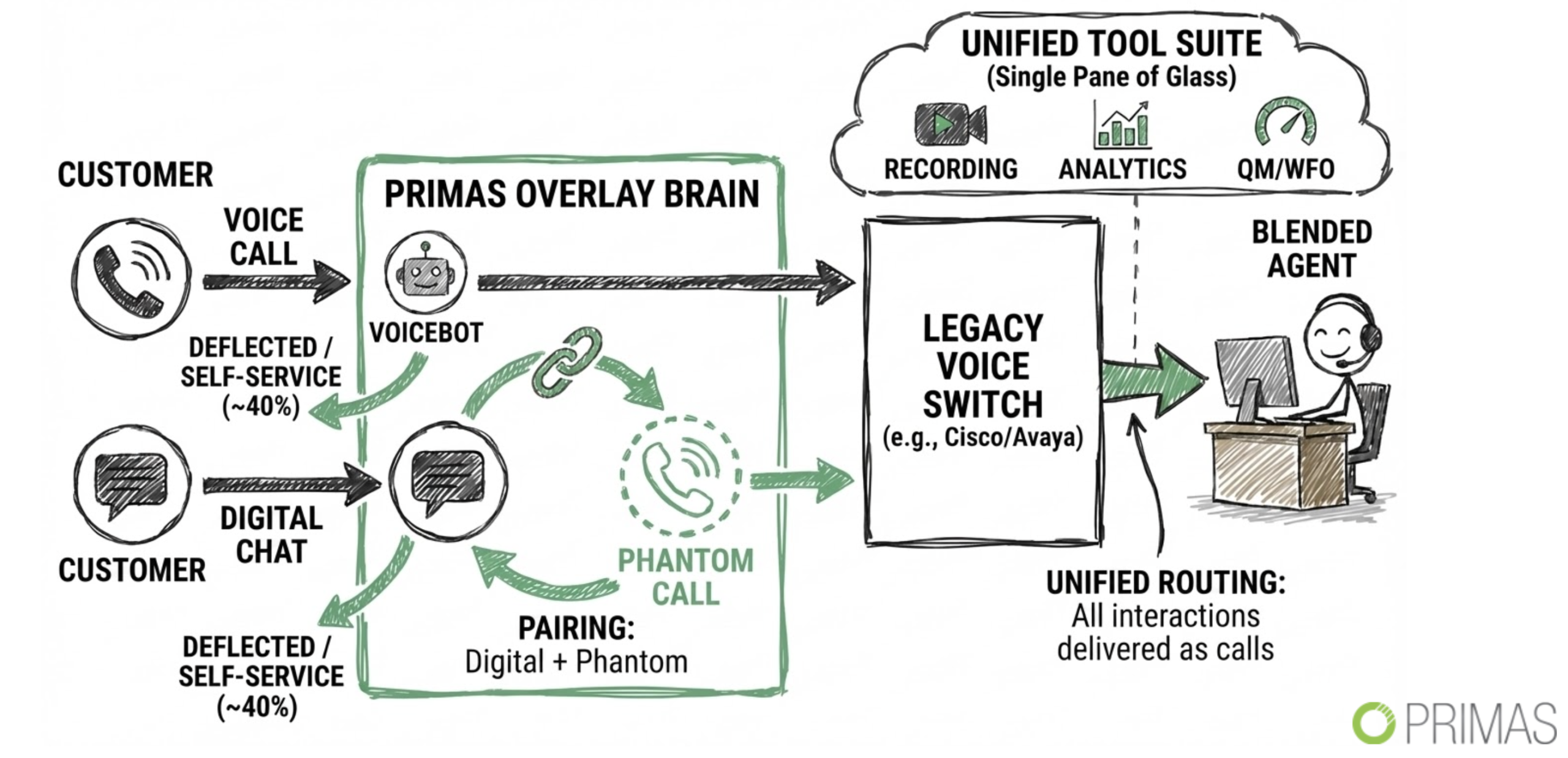
What that looks like on one real interaction
A customer messages you on WhatsApp about a billing error. The layer opens an incident and routes it to a billing-skilled agent by the same rules as a phone call. It’s complex, so the agent offers a video call-back; the customer taps a link and joins over WebRTC — no app to install. The agent’s screen already shows the WhatsApp thread and the CRM record (screen-pop), so the customer explains nothing twice. It’s resolved as one incident across two channels, recorded and logged to your CRM. Your ACD never changed — the customer just had one seamless conversation.
The step-by-step: add omnichannel without ripping out your ACD
1. Keep your ACD. Add the layer on top.
Your Avaya/Cisco/Genesys stays exactly where it is. The omnichannel layer connects through interfaces your platform already exposes — SIPREC (a real-time media copy), CTI (screen-pop and agent state), SIP (call control), and a WebRTC/SIP gateway for video and web calls. Before you start, confirm those interfaces are enabled on your switch; on most enterprise Avaya/Cisco/Genesys deployments they already are. Nothing about your existing routing, hunt groups or dial plan changes — you’re adding a parallel path, not rewiring the core. The test that you’ve done this right: you could switch the layer off and your contact center runs exactly as it did yesterday.
2. Unify to one desktop with same-caller, same-incident context.
This is the step that separates omnichannel from multi-channel, so don’t skip it to chase channels. Require two things: a single agent desktop (or an embedded CTI panel inside the CRM your agents already live in) that presents every channel, and a shared data model that keys each interaction to the customer and the incident, not the channel. Wire the screen-pop so the CRM/EHR record and the prior conversation open the instant the agent answers. The acceptance test: start a web chat, escalate it to a voice call-back, and confirm the agent sees the full chat transcript and the customer record without asking a single identifying question.
3. Add the channels your customers actually use — by demand, not all at once.
Look at where customers already try to reach you off-channel: the emails to the wrong inbox, the DMs, the “can you just text me” requests. Turn on the one or two highest-demand channels first — usually web chat and SMS, then social and video. Each channel is a connector that plugs into the layer, so adding one is a matter of days, not a migration. Resist launching six channels in a week; a channel with no staffing plan behind it just moves the queue somewhere new. Add the next only once the current one is staffed and measured.
4. Recover the contacts you’re losing today.
Legacy voice-only setups quietly leak contacts at the queue. Add intelligent callback so a caller keeps their place in line and gets called back instead of holding — then watch your abandonment rate before and after, because this is usually the fastest, clearest win. Add dropped-call reconnect so a lost call comes back to the same agent with context intact, and SMS self-service so routine requests — balances, confirmations, payments — never reach the queue at all. Each is a capability you switch on in the layer, not a new system to buy.
5. Add real social presence — monitoring, not just an inbox.
For public-facing brands and public-safety lines, treat social as a listening post as much as a reply channel. Set up keyword and brand monitoring so you see issues before they escalate, response templates (with approval) so replies are fast and on-message, and sentiment so you can triage the angry ones first. Handle all of it from the platform — agents reply without logging into personal or shared brand accounts, which is both a security and an audit requirement — and use post reports (reach, comments, sentiment over time) to give leadership the view they always ask for.
6. Keep the data where it has to stay.
In healthcare, finance, insurance and the public sector this one decision shapes the whole architecture, so make it first, not last. Decide what must stay inside your network — recordings, transcripts, PII, the audit trail — and run the layer on-prem or in your own cloud so it never leaves, with HIPAA, PCI DSS, FedRAMP and StateRAMP support and data residency. This is precisely what a public CCaaS migration can’t give a regulated operation, and it’s often the real reason “just move everything to the cloud” was never an option in the first place.
7. Pilot one channel, prove it, then scale.
Pick the single channel that relieves the most pressure — usually chat or SMS — and run it in parallel with how you operate today. Define what “working” means up front: resolution rate, CSAT, abandonment and cost per contact, measured against a baseline you capture before you start. Give it a real decision gate at 30–60 days — if it hits the numbers, expand to the next channel and more agents; if it doesn’t, you’ve risked nothing and learned cheaply. Every step is reversible; you never bet the operation on a big-bang cutover.
The mistakes to avoid
- Rip-and-replace to a cloud CCaaS as the default — it’s the biggest, most expensive, least reversible move, and rarely the right first one for a legacy or regulated shop.
- Bolt-on point tools — a separate app per channel gives you a swivel chair, not omnichannel. Insist on one desktop and shared context.
- Letting data leave your network — in regulated verticals that decides the whole architecture; solve it first, not last.
- Treating social as an afterthought — for a public-facing or public-safety operation, monitoring and sentiment matter as much as the reply.
What this looks like with Primas
We’re a 30-year contact-center integrator, not a migration vendor. The Primas CX Suite adds omnichannel and social as a layer on your existing Avaya, Cisco or Genesys — one agent desktop with same-caller context, intelligent callback, recording, supervisor wallboards, and social monitoring — running on your infrastructure, owned by your team, with no rip-and-replace and no lock-in. It’s live today in regulated, multi-site operations, including a leading US academic health system (on their existing Avaya + Epic) and a national emergency line running multimedia and social monitoring at public-safety scale.
Explore the Primas CX Suite →
Book a 30-minute strategy session
Frequently asked questions
How do I modernize a legacy call center without replacing it?
Add the missing capabilities — omnichannel, social, AI — as a layer on top of your existing Avaya, Cisco or Genesys via SIPREC/CTI/SIP, rather than migrating to a new platform. You keep the telephony, integrations and data residency you already have.
Can I add omnichannel to my contact center without a rip-and-replace?
Yes. Chat, email, SMS, video/WebRTC and social connect to your existing ACD and land on one agent desktop — no migration off your current stack.
What’s the difference between multi-channel and true omnichannel?
Multi-channel is separate tools per channel, so the agent swivels between screens. True omnichannel is one desktop with shared same-caller, same-incident context, so the customer never repeats themselves across channels.
Is this an alternative to a cloud CCaaS migration?
For a legacy or regulated operation, yes — it adds the modern channels without giving up your on-prem telephony, your integrations, or your data residency, and without a multi-year migration.
Can it keep our data on-premises for compliance?
Yes — the layer runs on-prem or in your own cloud so PII never leaves your network, with HIPAA, PCI DSS, FedRAMP and StateRAMP support and data residency.
Does it include social media monitoring?
Yes — keyword monitoring, response templates, post reports and sentiment across Facebook, WhatsApp, Line and Zalo, handled from the platform.