
Search “how to add AI to your contact center” and most of the advice quietly assumes one thing: that you’ll move to a new platform to get it. Rip out the Avaya, Cisco or Genesys you’ve run for a decade, migrate everyone to some AI-native cloud, and start over.
For most operators that’s a non-starter — and it’s the wrong instinct. Your telephony works. Your routing, your integrations, your compliance posture, your agents’ muscle memory — all of it is worth keeping. After thirty years building contact centers, here’s the thing we tell every operator: you add AI as a layer on top of the stack you already run. You don’t replace the stack to get the AI. This guide is how you actually do that.
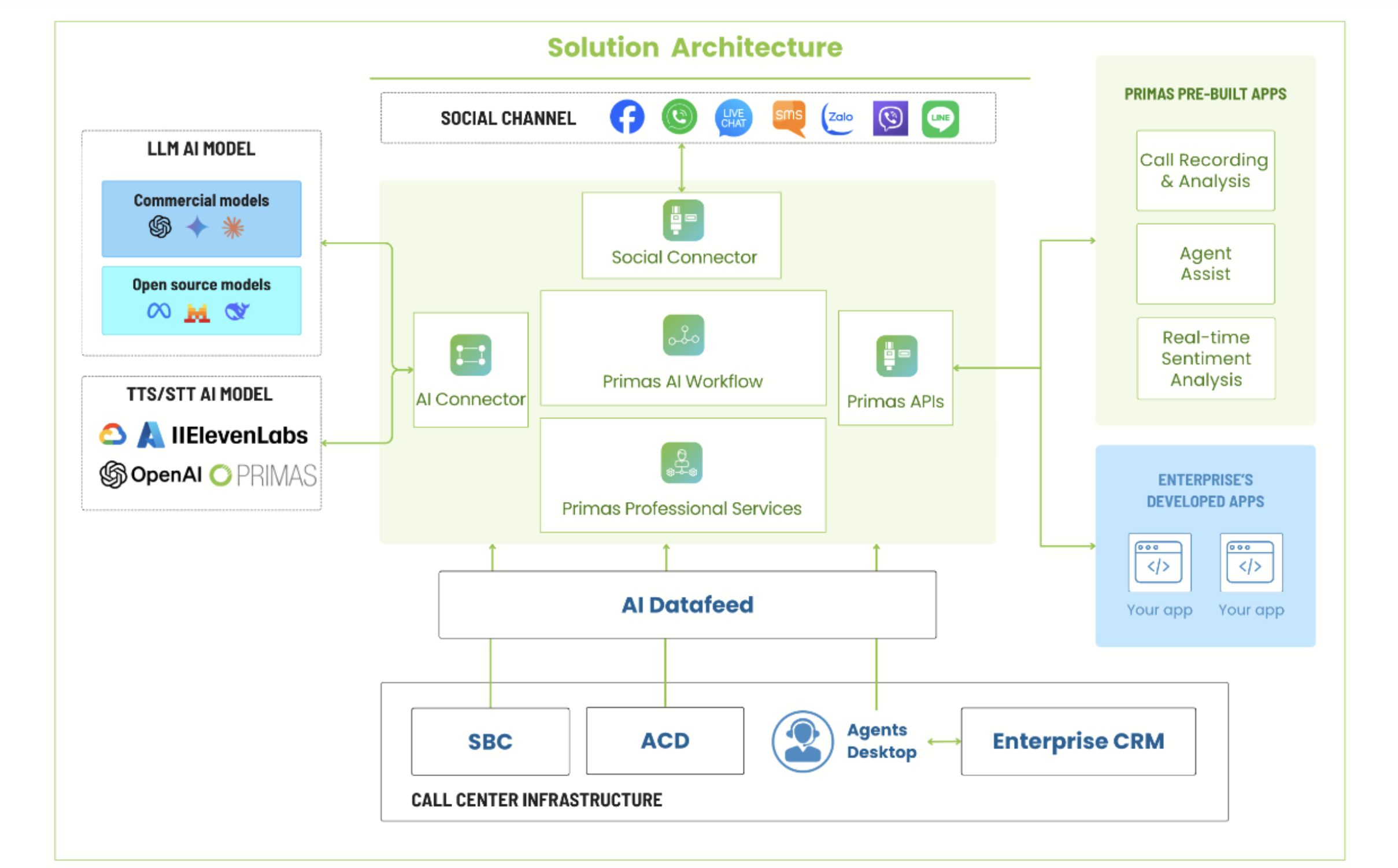
Step 1 — Understand how AI connects to what you already have
This is the part the generic guides skip, and it’s the part that decides whether a project is a two-week pilot or a two-year migration. AI doesn’t need to become your contact center; it needs three things from it:
- The audio — via SIPREC, your platform forks a real-time copy of the call to the AI. Nothing about how the call is handled changes; the AI just gets to listen (and, for a voicebot, to speak).
- The screen and agent state — via CTI, the AI can trigger a screen-pop, read who’s on the call, and push suggestions to the agent’s desktop, using the same CTI layer your platform already exposes.
- Call control — via SIP, a voicebot can answer, hold, transfer, and hand off to a human with context.
On the agent side, a lightweight browser extension surfaces real-time assist without replacing the agent desktop. And the AI reads and writes to the systems you already run — Salesforce, Dynamics, ServiceNow, your EHR — so it can verify a caller, pull an account, and log the outcome where your team already looks.
The practical takeaway: if you’re on Avaya, Cisco, Genesys, Amazon Connect (or on-prem Vicidial/Asterisk), the integration points already exist. You’re adding a layer through standard interfaces — not re-platforming.
Step 2 — Pilot on your own data before you touch a live call
The fastest way to kill an AI project is to point it at production on day one. The path that works is deliberately boring:
- Experience — build a working version of one AI use case on your test data and your real call recordings. Prove it does what you need on conversations you already understand, where a mistake costs nothing. This is where you learn whether the thing is real.
- Production — put it live on actual calls, in parallel with how you run today, and watch the numbers.
- Scale — once it earns its place, expand it across more agents, more sites, more use cases.
Crawl, walk, run. Every step is reversible, and you never bet the operation on an unproven model. This is also the honest answer to “how do I upgrade to AI without disrupting operations?” — you don’t upgrade, you add, in parallel, and only cut over what has proven itself.
Step 3 — Start with one use case, not ten
“Add AI” is not a project; a specific use case is. Pick the one with the clearest, measurable payoff and start there. In most contact centers it’s one of these:
- AI Quality Assurance — score 100% of calls against your own rubric instead of a 5% manual sample. Low risk (it reads, it doesn’t talk to customers), fast to prove, and it pays for itself in coverage.
- A voicebot for one high-volume, routine call type — payment-date changes, balance checks, appointment scheduling. Contained scope, obvious deflection math.
- Agent Assist — real-time answers and next-best-action on the agent’s screen, so a week-one hire performs like a veteran.
Prove one. Its win funds the next. Trying to launch all three at once is how pilots stall.
The mistakes that sink these projects (learned the expensive way)
- Rip-and-replace. Migrating the whole platform to get AI is the biggest, most avoidable risk. Add the layer instead.
- The black box. If you can’t see why the AI scored a call the way it did — or you can’t edit the rules — you can’t defend it to a client or a regulator. Insist on seeing the reasoning and owning the logic.
- Vendor lock-in. Models change every few months. If you can’t swap the LLM, the speech-to-text or the text-to-speech, you’re frozen to one vendor’s roadmap. Keep it model-agnostic.
- Ignoring where the data lives. In healthcare, finance, insurance and the public sector, “send your calls to our cloud” is a dead end. An on-prem option that keeps data inside your network isn’t a nice-to-have.
- Boiling the ocean. Ten use cases, no owner, no baseline. Start with one, measured.
You should own what you build
Here’s the point of view that shapes how we do this, and it’s the one thing we’d ask you to hold onto no matter who you work with: the operation should own the AI, not rent it. The team that runs your contact center understands your calls better than any vendor — so the rubric, the flows, the knowledge base should be theirs to edit, and what you build should keep working if the vendor disappears. Build with a partner who knows telephony, but build something you own. No black box, no lock-in, models you can swap as the field moves.
For regulated operations that also means real compliance: on-prem deployment, and HIPAA, PCI DSS, FedRAMP, StateRAMP support with data residency — so the AI layer meets the same bar your contact center already does.
What this looks like with Primas
We’re a contact-center system integrator, not a rip-and-replace AI startup — thirty years, 100+ customers, built on the telephony operators already run. We add conversational voicebots, agent assist, AI QA and outbound on top of your Avaya, Cisco or Genesys, custom to your workflows, owned by your team — and the same layer approach adds omnichannel and social. You start with one use case on your own data, prove it, and scale.
See the AI Voicebot + Agent Assist platform →
Book a 30-minute strategy session
Frequently asked questions
How do I integrate AI with my existing contact center and CRM?
Through the interfaces your platform already exposes — SIPREC for the call audio, CTI for screen-pop and agent state, SIP for call control — and standard API connections to your CRM (Salesforce, Dynamics, ServiceNow) so the AI can verify callers, pull accounts, and log outcomes where your team already works. No re-platforming.
Can I add AI without ripping out my current platform?
Yes. AI is added as a layer on top of your existing Avaya, Cisco, Genesys or Amazon Connect — no rip-and-replace and no migration off your stack.
How do I pilot AI in my contact center without disrupting operations?
Build one use case on your test data and recordings first, then run it live in parallel with how you operate today, and only cut over what proves itself. Every step is reversible.
Which AI use case should I start with?
The one with the clearest measurable payoff and contained scope — usually AI Quality Assurance (low risk, fast to prove) or a voicebot for one high-volume routine call type. Prove one before adding more.
Can I use my own LLM, or am I locked to the vendor’s?
It should be model-agnostic — you can swap the LLM, speech-to-text and text-to-speech as the technology changes, rather than being frozen to one vendor’s roadmap.
Is it secure enough for regulated contact centers?
Yes — an on-prem option keeps sensitive data inside your network, with HIPAA, PCI DSS, FedRAMP and StateRAMP support and data residency.