
AI self-service is technology that lets a customer resolve a routine request themselves — over voice, chat or a guided digital flow — in plain language, 24/7, and hands off to a person the moment the request needs one. Done right, it doesn’t just deflect the contact; it finishes the job: verifies who’s calling, looks up the account, and completes the task.
That distinction is where most self-service goes wrong. A containment number looks great on a dashboard and terrible to a customer who got stuck in a loop and hung up angrier than when they called. After thirty years building contact centers, we’ll say it plainly: containment is a vanity metric. Resolution is the one that moves CSAT. The five things below separate self-service customers actually like from self-service they learn to dodge.
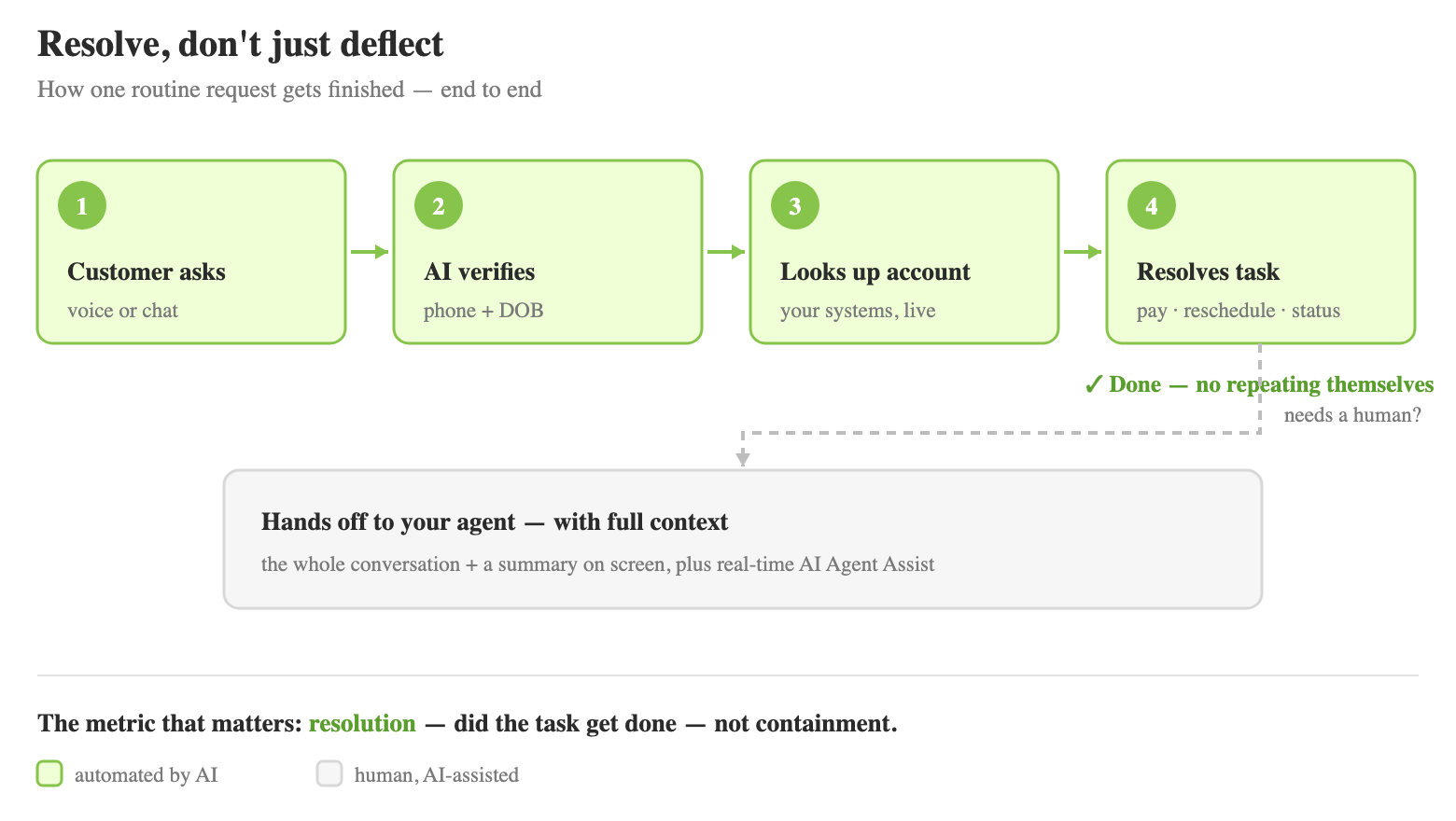
1. It answers instantly, in plain language — not a menu tree
The fastest way to lose a caller is “Press 1 for billing, press 2 for…” A modern AI voicebot or chatbot lets the customer just say what they want — “I need to move my payment date” — and understands the intent in their own words, with no menu to memorize and no queue to wait in (here’s the real benefits and limits of IVR). The same assistant runs on the phone and on web chat, WhatsApp, Line, Facebook or Zalo, so the experience is identical wherever the customer reaches you, at 2 a.m. or during a Monday spike.
Instant, natural, always-on: that’s table stakes for satisfaction. It’s also the easy 80% of your volume — the repetitive questions that don’t need a human and frustrate everyone when they have to wait for one.
2. It resolves the request end-to-end — it doesn’t just deflect it
This is the part thin “chatbots” skip. Real self-service completes the task: it verifies the customer (by phone number and date of birth through natural conversation, for example), pulls the account in real time from your systems, and acts — reads back a balance, extends a payment date, schedules an appointment, takes a payment, checks an order’s status.
What that looks like on a real call:
Caller: “I need to move my payment date this month.”
AI: “I can help with that. First, let me verify you — what’s the phone number on the account, and your date of birth?”
Caller: “555-0142, March 4th 1981.”
AI: “Thanks, you’re verified. I see a payment of $214 due on the 3rd. I can move it as late as the 18th — would the 15th work?”
Caller: “Yes, the 15th.”
AI: “Done. Your $214 payment is now scheduled for the 15th, and I’ve texted you a confirmation. Anything else?”
No queue, no menu, no “press 1.” The customer hangs up done, not deflected to the website — and that is the entire difference between a deflection metric and a happy customer. It’s why an AI layer that’s actually wired into your account systems beats a bolt-on FAQ bot every time. This is exactly what our AI Voicebot + Agent Assist platform does end to end — verify, retrieve, resolve, hand off.
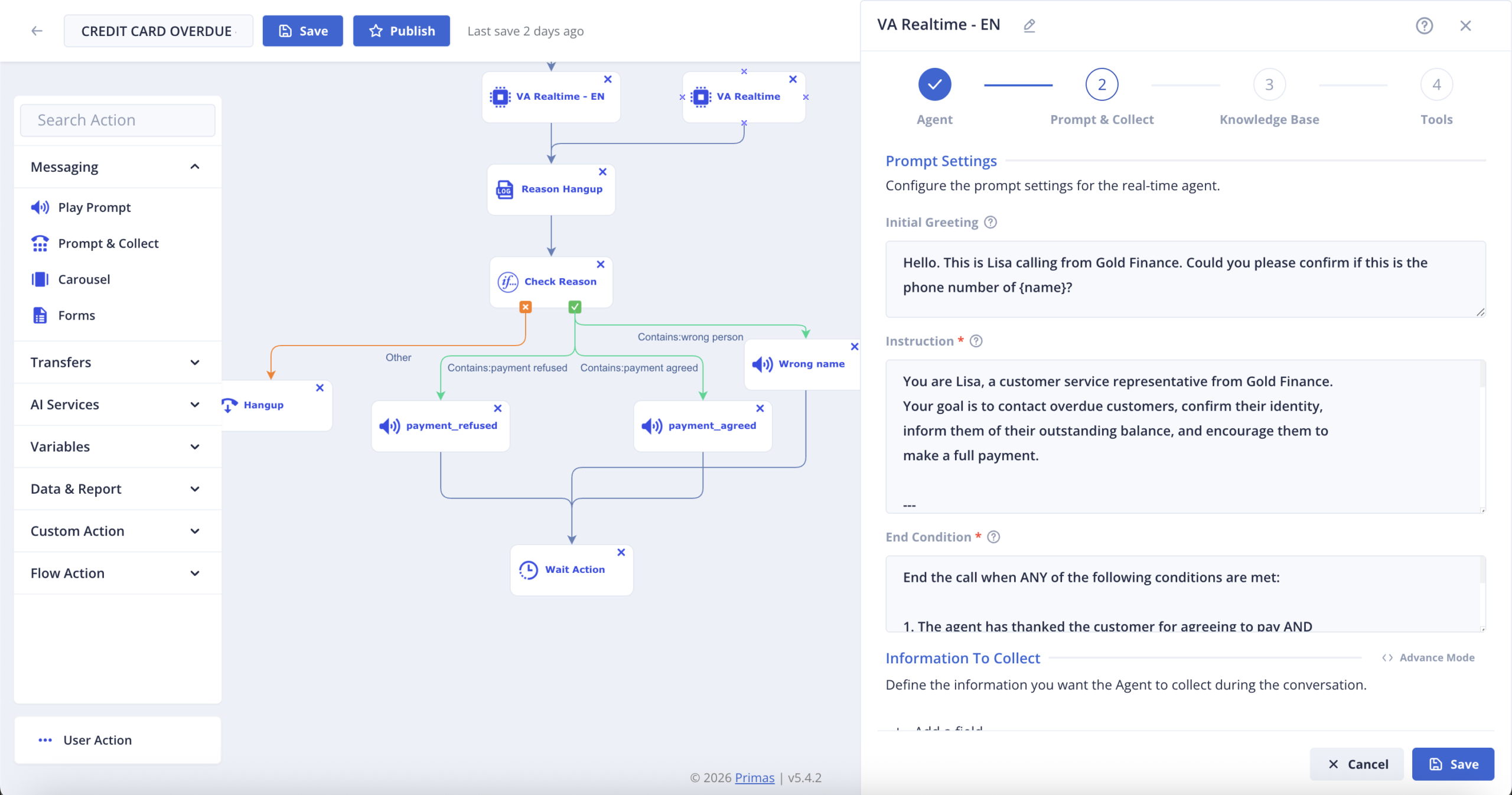
3. It turns a 20-minute phone task into a 5-minute guided flow (Visual IVR)
Some tasks are miserable by voice — reading out a long policy number, spelling an address, entering 16 digits. Visual IVR fixes that: mid-call, the AI sends a link, and the customer completes a short guided form on their phone (with voice assist if they want it), then drops back into the conversation. A national car insurer used this to cut a registration flow from about 20 minutes to about 5 — roughly 75% faster. Less effort for the customer is, directly, higher satisfaction.
4. When a human is needed, the hand-off carries full context — so customers never repeat themselves
The single biggest CSAT killer in any contact center is “let me transfer you” followed by “so, can you explain your issue again?” Good self-service eliminates that. When a request needs a person — a judgment call, an exception, an upset customer — the AI transfers to your agent with the full conversation and a summary already on screen, plus real-time AI Agent Assist suggesting the next step. The customer picks up mid-sentence with someone who already knows the story.
That’s the blended model we build toward: automate the routine 80%, and elevate your people for the 20% that actually needs them. Your team stops doing password-reset-grade work and spends its time where judgment pays off — and a week-one hire can handle the call like a veteran, because the assist is doing the remembering.
5. It answers from your policies, securely — accurate and compliant
Generic AI that makes up an answer is worse than no AI. Self-service that customers trust is grounded in your knowledge base and business rules — your refund policy, your eligibility logic, your scripts — not whatever the model read on the open web. For regulated work that also means the data stays where it has to: an on-prem option keeps sensitive data inside your network, with HIPAA, PCI DSS, FedRAMP and StateRAMP support and data residency.
This is not theoretical. Primas built a HIPAA-compliant patient self-service and contact-center ecosystem for a leading US academic health system around its existing Avaya core and Epic EHR, and stood up a FedRAMP-compliant voicebot for a US state agency — live in two months. Accurate answers plus provable compliance is what makes self-service safe to turn on in healthcare, finance, insurance and the public sector.
Where to start: which requests to automate first
You don’t automate everything on day one, and you shouldn’t. The requests worth handing to AI self-service first share two traits: they’re high-volume and they’re rule-based — the answer follows from data and policy, not judgment. Balance and order-status checks, payment-date changes, appointment scheduling, password-grade resets, “where’s my refund” — automate those, and you’ve taken the repetitive 80% off your queue.
Keep a human on the rest: disputes, complaints, complex exceptions, anything that needs empathy or negotiation. Those are low-volume and high-judgment — exactly where your people earn their keep, and exactly where a bot frustrates everyone.
Then measure the right thing. Containment (did we keep them out of the queue?) is the wrong metric — resolution (did the customer’s task actually get done?) is the right one. A high containment rate with a low resolution rate just means people are hanging up angry. Watch two numbers alongside it: repeat-contact rate within 48 hours (a spike means you deflected without resolving) and the share of escalations that arrive with full context (so the human isn’t starting cold). And for the calls a human does take, score every one — AI call center quality assurance checks 100% of them against your rubric, not a 5% sample.
One honest caveat from experience: don’t automate a broken process. If a task is a mess for your human agents — unclear policy, data in three systems that don’t talk — automating it just scales the mess. Fix the flow first, then put AI on it.
The catch most vendors won’t mention — and how to avoid it
Everything above is achievable. The reason most teams don’t have it is that the big self-service platforms assume you’ll rip out your contact center and move to their cloud — a risky, expensive, multi-year migration for anyone running on Avaya, Cisco or Genesys.
You don’t have to. Primas adds the AI layer on top of the telephony you already run — through standard SIPREC/CTI/SIP integration, no rip-and-replace. Here’s exactly how AI drops onto your existing stack. You keep your stack, you own what you build, there’s no vendor lock-in (swap the underlying AI models freely as the tech changes), and it’s run by a team that has built contact centers since 1994. That’s the difference between an AI story you can actually ship this quarter and one that’s stuck behind a migration.
If you’re starting fresh on a modern cloud stack, there are great plug-in voicebots for that. Primas is for the contact centers that can’t start over — and shouldn’t have to.
See it running on your stack
If you run a contact center on Avaya, Cisco or Genesys and want AI self-service that resolves — not just deflects — see how the pieces fit together on the AI Voicebot + Agent Assist platform, or book a 30-minute strategy session: we’ll look at your existing setup and map where self-service pays off first. No pricing pitch, no obligation.
See the AI Voicebot + Agent Assist platform →Book a 30-minute strategy session
Frequently asked questions
What is AI self-service?
AI self-service lets customers resolve routine requests themselves — over voice, chat or a guided digital flow — in natural language, 24/7, and escalates to a human when a request needs one.
What is AI self-service automation?
Using AI to complete common requests end-to-end — verify the customer, look up the account, and act (pay a bill, move a payment date, schedule, check status) — without an agent, so staff focus on the complex cases.
What’s the difference between AI self-service and a regular chatbot or IVR?
A traditional IVR routes you through menus and a basic chatbot answers FAQs. AI self-service understands plain language and is wired into your account systems, so it can finish the task, not just point you to a page.
Can AI self-service work with my existing Avaya, Cisco or Genesys system?
Yes. Primas adds the AI layer on top of your current telephony via SIPREC/CTI/SIP — no rip-and-replace and no migration off your stack.
Is AI self-service secure and compliant?
Yes. An on-prem option keeps sensitive data inside your network, with HIPAA, PCI DSS, FedRAMP and StateRAMP support and data residency for regulated industries.
How does AI self-service hand off to a live agent?
It transfers with the full conversation and a summary on the agent’s screen, plus real-time AI Agent Assist — so the customer never has to repeat themselves.
How fast can we go live?
A phased path: a working app on your test data first, then live on real calls, then scale. A US state agency went live on a compliant voicebot in about two months.